ohmSTAR Companion for Windows
Windows 10 or later, x64. Not signed yet: choose More info, Run anyway.
Download for WindowsFree shipping to the lower 48 US states. International orders ship by DHL. Education pricing for schools.
ohmSTAR Companion · Windows, macOS, Linux
The ohmSTAR Companion is the desktop app for the ohmSTAR and ohmSTAR+. It draws the box's own display and keypad on your screen, then takes over the work: sensor curves, sweeps, strain profiles, pass/fail sequences, logging, scripting and an AI assistant that runs the box from a sentence. Set it up once and it basically automates itself. Every clip on this page is a real session, recorded in the app.
ALLOne app for the whole bench
Sensor curves, sweeps, strain profiles, pass/fail sequences, logging, scripting, an AI assistant and a calibration bench, in one app that connects to the box by itself.
The app finds the box and reads in its 14 memories, settings and calibration record. No box yet? Mock ohmSTAR+ lets you learn the app first.
Type 4700, 10k or 1.5M. Every value is checked against your model before it's sent; out of range is refused, with the reason.
Sweeps, pass/fail sequences and CSV logging run unattended. The AI assistant runs the box from a sentence, and asks before it acts.
Free, at your own bench, with a 34401A meter. The signed record goes into the box and the certificate is made for you. How it works
Missing something? We'll build it.
Tell us what your bench needs, and our in-house software team can add it.
01Device page
The Device page is the box itself, with a mouse. Type a value and the display answers; open the panels below it and the box's 14 memories, its settings and its calibration record read themselves in. Nothing to transcribe, nothing to remember. Switch to compact mode for a persistent ohmSTAR window on your desktop, with two-way communication.
Use it for
02Temperature to ohms
This is the page a controls engineer lives on. Pick the sensor the controller expects, type the temperature you want the controller to believe, and the box becomes that sensor at that temperature. The curve maths, the rounding, the range check: all done for you before anything is sent.
Use it for
03Sensor library
The library is where every sensor feature starts. Search by name, type or maker; the curve, its range and its maker's document are right there. No tables to type in, ever: 128 sensors, already verified, one click from the box.
Use it for
The box can hold nine user tables. With one loaded and selected at the keypad, the box reads temperatures directly: a technician types 25 and the output becomes 109.74 Ω.
04Sweeps
A sweep is the Companion's workhorse, and the clearest case of the app doing the job for you. Set a range, a step and a hold, press Start, and walk away: up to 5,000 values a pass, looped up to 100,000 times, held from 0.3 s to 24 h each, every one logged. Resistance, temperature or strain; six shapes.
Use it for
05Strain gauges
A 120 Ω gauge at 1000 µε is 120.24 Ω: a quarter of an ohm. That's why the ohmSTAR+ steps in 0.01 Ω. This page takes a gauge resistance, a gauge factor and a lead resistance, turns a strain profile into those tiny steps, and runs it, ten cycles or ten thousand, while you do something else.
Use it for
STEP 9 OF 10, LOOP 1 OF 10; the graph shows the whole train of cycles. 349.65 Ω at −500 µε, 350.35 Ω at +500 µε.06Sequences and reports
A sequence is a test procedure that runs itself. Write the steps once: a resistance or a sensor value, a label, and what to check. The app sets each one, you type what the equipment showed and mark Pass, Fail or Skip, and the report writes itself, every run, every time.
Use it for
07Custom tables
A table is two columns: the sensor's unit and the ohms. Build one from a formula, load a two-column CSV, or start from a library sensor. Then run it from the app, or store it in the box so the box runs it with no computer at all.
Use it for
08CSV logging
Switch logging on once and forget it. The app writes one file a day, ohmstar-YYYY-MM-DD.csv, with every value from every page: sweeps, sequences, the slider, the command line, the AI. Nothing to remember to start, nothing to export.
Use it for
info, set 4.7k, temp pt100 25, sensors 10k. The same commands come as a separate ohmstar tool for scripts.09Command line, network API, several boxes
Three ways to put the box inside your own automation, all through the Companion's connection, so they never fight over the serial port. A test station, a LabVIEW rig or a cron job can own the box as easily as a person can.
Use it for
GET /v1/state, POST /v1/resistance, POST /v1/sensor, GET /v1/sensors. A bearer token guards it; Allow AI control (MCP) adds the /mcp route. Setup lines for Terminal, PowerShell, Claude Code, Codex and Claude Desktop are ready to copy.10AI assistant
AI approvedThis is where the app stops needing an expert at all. Describe the test; the assistant defines the sensor, plans the sweep, previews it and runs it. It's a language model with hands on the box, on a short leash: before anything changes, it shows exactly what it will send and waits for Allow. Stopping a sweep never asks.
Models
11Settings and the calibration bench
Settings is where the side bar is shaped. Presets switch pages on and off in groups; one of them, Cal lab, adds a whole second tab for calibrating boxes against a reference multimeter, in Auto mode, with the certificate written and signed for you.
Use it for
12Light, dark and compact
Two small things that matter on a real bench: a light theme for a bright lab, and a compact window that stays on top of your DAQ software.
Use it for
A phone-shaped window with only the display, the keypad and Set resistance or temperature. Tick Keep on top and it floats over LabVIEW, a terminal or a browser while you work. Full window brings everything back.
FWohmSTAR and ohmSTAR+
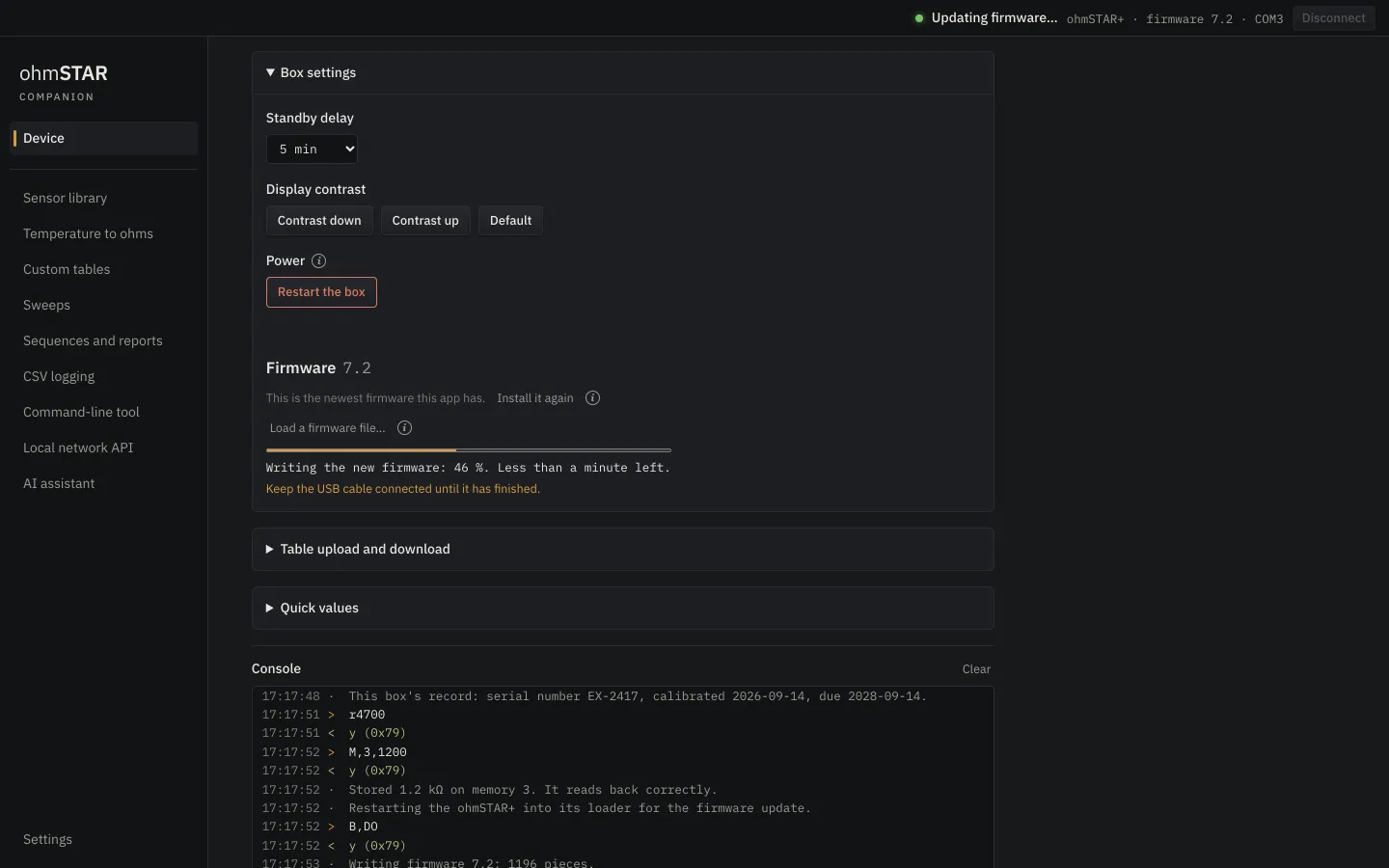
Firmware 7.x adds a bootloader: the last flash with a programmer. After it, every update goes over USB from the Companion, and a failed update can always be retried. It takes about 3–4 minutes. Calibration, serial and the stored record are never touched.
Stuck in update mode? Hold M at power-on, then press the repair button in the app.
Also in firmware 7.x
Guard rails
An app that runs the box for you needs rules. These are hard limits on what any script or AI can do with it, and every AI action is logged in the app.
AI sweeps are tighter: 1,000 values a pass, 100 loops, 10,000 values in all, 24 h. Refused while a calibration, a table upload or a firmware update has the box, or while a table is active on it.
For ohmSTAR and ohmSTAR+. Firmware updates are built in and run themselves over USB. No box yet? The mock box lets you try every page.
Windows 10 or later, x64. Not signed yet: choose More info, Run anyway.
Download for WindowsmacOS 13 or later, Apple chip or Intel. First start: right-click, Open.
Download for Apple chipDownload for IntelAppImage, 64-bit (x86_64).
Download for LinuxClosed-source. The installed app refuses debugging back doors, and its signing keys are sealed by the operating system.
Scripting, the HTTP API, Python and the short PDF guides: Resources. Questions: contact support.